Unlocking Developer Productivity with Copilot Chat’s New URL Context
Jessie Houghton explores the new URL context feature in GitHub Copilot Chat, showing how Visual Studio developers can leverage real-time web information for better coding support.
Unlocking Developer Productivity with Copilot Chat’s New URL Context
GitHub Copilot Chat is a powerful coding assistant, but until now, its responses were limited to the model’s built-in training data. This could be frustrating for developers looking for guidance on the latest web frameworks, documentation, or project-specific resources where Copilot’s answers might lack the latest details.
Introducing URL Context for Copilot Chat
With the newly released URL context feature, Copilot Chat can now pull information directly from web pages you specify. To use it, simply paste the desired URL into your chat prompt. Copilot will retrieve that page’s content and incorporate relevant information into its answers, making support more personalized and up-to-date.
This is especially valuable when referencing:
- New or niche web frameworks
- Updated documentation
- Project-specific or internal resources
By pointing Copilot Chat to specific URLs, developers can receive more context-aware responses extending beyond what Copilot “knows” from its training.
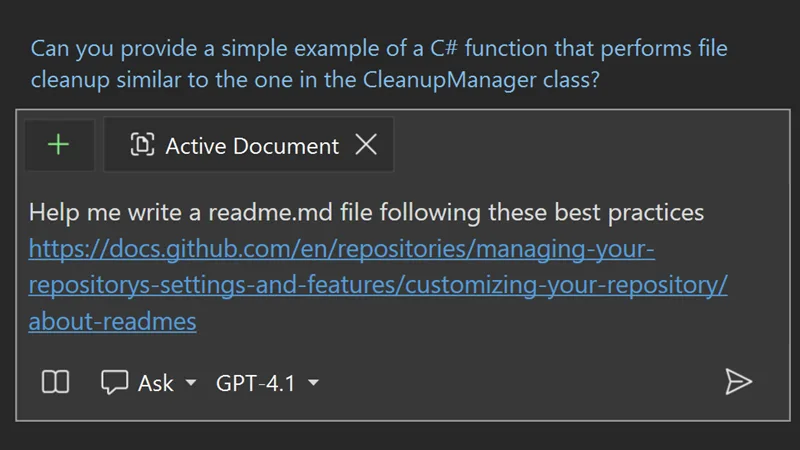
How to Use Reference URLs in Copilot Chat
- Identify the web resource relevant to your coding question.
- Paste its URL directly into the Copilot Chat prompt.
- Copilot will process the page and use its contents to inform its response.
Practical Example
If you’re working with a new JavaScript framework and the documentation isn’t widely known, simply paste the documentation link into Copilot Chat. Copilot Chat will then pull and reference the latest content as it answers your question.
Limitations to Consider
While this feature bridges gaps in Copilot’s training, keep in mind:
- Copilot’s access depends on the public availability and structure of the web page
- Authentication barriers, dynamic content, or cluttered pages may impede extraction
- Always review Copilot’s answers for accuracy and completeness, especially for complex, technical sources
Stay Connected with Visual Studio
Explore the Visual Studio Hub for release notes, videos, and community updates. For feedback or suggestions, visit the Developer Community.
Conclusion
URL context in Copilot Chat makes it easier for developers to inject the latest information into their coding workflow, elevating the value and precision of Copilot’s assistance in Visual Studio.
This post appeared first on “Microsoft VisualStudio Blog”. Read the entire article here